Shapes are objects
Line, Circle, Rectangle, Arc and friends each carry their own stroke, fill and vertices. Subclass BaseShape to make your own.
Each shape has its own style and transform methods, and everything saves to SVG.
$pip install LineDream
Set the canvas size, add some shapes, rotate them, and save.
from LineDream import Canvas, Rectangle

Canvas.width = 300
Canvas.height = 300
Canvas.background_color = '#263238'

for x in range(18):
	r = Rectangle(150, 150, 200, 200)
	r.rotate(10 * x)
	r.stroke_color = '#FFCB6B'

Canvas.save("rectangles.svg")
LineDream was originally designed for pen plotters, so its SVGs work well on them out of the box. It's just as useful for general SVG creation.
Line, Circle, Rectangle, Arc and friends each carry their own stroke, fill and vertices. Subclass BaseShape to make your own.
Call rotate(), scale() or transform() on any shape, around any origin. No push/pop matrix bookkeeping.
Set Canvas.units = 'mm' for real-world sizes, and use Group to export Inkscape layers, one per pen.
Text renders with Hershey fonts: lettering made of strokes, not outlines, so a pen draws each character once.
These are generated by LineDream when the site is built. Click one to see its code.
Install from PyPI, then work through the guide.
$pip install LineDream
import math
import random
from LineDream import Canvas, Line

random.seed(11)

Canvas.width = 600
Canvas.height = 600

def angle_at(x, y):
	return (math.sin(x * 0.009 + math.cos(y * 0.011) * 1.4)
	        + math.cos(y * 0.007 - x * 0.003)) * math.pi * 0.75

for gx in range(-20, 620, 28):
	for gy in range(-20, 620, 28):
		x, y = gx + random.uniform(-10, 10), gy + random.uniform(-10, 10)
		pts = []
		for _ in range(random.randint(18, 40)):
			pts.append((x, y))
			a = angle_at(x, y)
			x += math.cos(a) * 5
			y += math.sin(a) * 5
		accent = random.random() < 0.07
		Line(pts, stroke_color='#E8A33D' if accent else '#1C1B18',
		     stroke_width=1.6 if accent else 0.8)

Canvas.save("flow_field.svg")
import random
from LineDream import Canvas, Square

random.seed(3)

Canvas.width = 360
Canvas.height = 600
Canvas.background_color = '#F4EEE1'

cols, rows, size = 10, 18, 26
x0 = (Canvas.width - cols * size) / 2 + size / 2

for row in range(rows):
	chaos = row / rows
	for col in range(cols):
		jitter_x = random.uniform(-1, 1) * chaos * 9
		jitter_y = random.uniform(-1, 1) * chaos * 9
		s = Square(x0 + col * size + jitter_x, 64 + row * size + jitter_y, size)
		s.rotate(random.uniform(-45, 45) * chaos)
		s.stroke_color = '#1C1B18'

Canvas.save("schotter.svg")
import math
from LineDream import Canvas, Line

Canvas.width = 600
Canvas.height = 600
Canvas.background_color = '#263238'

cx, cy = 300, 300

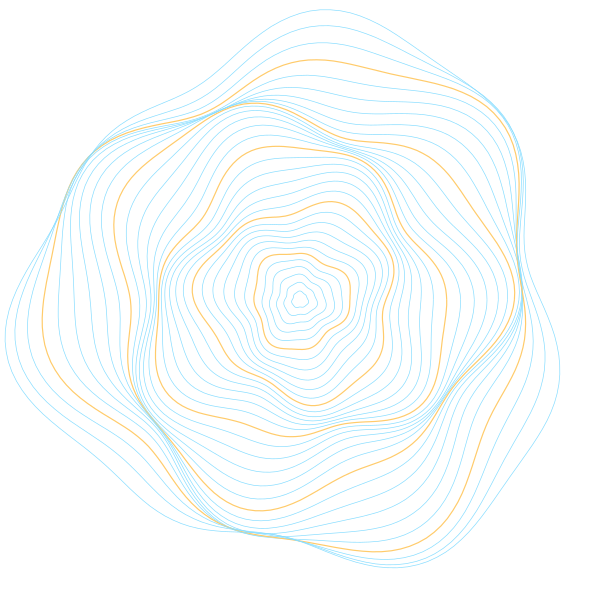
for ring in range(1, 34):
	base = ring * 8
	pts = []
	for step in range(181):
		t = math.radians(step * 2)
		wobble = (math.sin(t * 3 + ring * 0.35) * 0.09
		          + math.sin(t * 7 - ring * 0.2) * 0.04)
		r = base * (1 + wobble)
		pts.append((cx + math.cos(t) * r, cy + math.sin(t) * r))
	color = '#FFCB6B' if ring % 6 == 0 else '#89DDFF'
	Line(pts, stroke_color=color, stroke_width=1.2 if ring % 6 == 0 else 0.7)

Canvas.save("topography.svg")
import math
from LineDream import Canvas, Line

Canvas.width = 600
Canvas.height = 600
Canvas.background_color = '#F4EEE1'

R, r, d = 200, 72, 150
cx, cy = 300, 300

pts = []
for step in range(0, 9 * 360 * 2 + 1):
	t = math.radians(step / 2)
	x = (R - r) * math.cos(t) + d * math.cos((R - r) / r * t)
	y = (R - r) * math.sin(t) - d * math.sin((R - r) / r * t)
	pts.append((cx + x, cy + y))

Line(pts, stroke_color='#C2410C', stroke_width=0.7)

Canvas.save("spirograph.svg")
from LineDream import Canvas, Circle

Canvas.width = 600
Canvas.height = 600
Canvas.background_color = '#F4EEE1'

for r in range(6, 300, 6):
	Circle(270, 280, r, stroke_color='#1C1B18', stroke_width=0.8)
	Circle(340, 320, r, stroke_color='#1F5FAE', stroke_width=0.8)

Canvas.save("moire.svg")